Effective in 2026, to align with our trunk stable development model and ensure platform stability for the ecosystem, we will publish source code to AOSP in Q2 and Q4. For building and contributing to AOSP, we recommend utilizing android-latest-release instead of aosp-main. The android-latest-release manifest branch will always reference the most recent release pushed to AOSP. For more information, see Changes to AOSP.
Capture traces on device
Stay organized with collections
Save and categorize content based on your preferences.
Capture traces on the device to collect data when filing bugs for animation
issues.
All UI traces are recorded with the Record trace Quick Settings tile, as
the configuration can't be customized.
On your Android-powered device:
- Enable developer options.
- Select System Tracing under Developer Options.
- Enable Collect Winscope traces.
- Under Miscellaneous:
- Enable Attach recordings to bug reports.
- Enable Show Quick Settings tile.
- Navigate to where you need to reproduce the bug.
To start the capture, open Quick Settings and select Record trace:
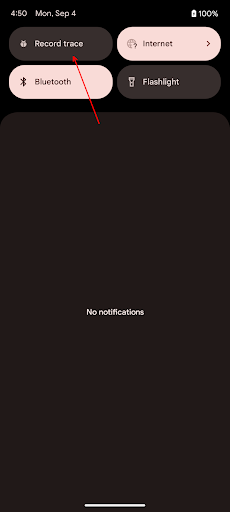
Figure 1. Quick Setting menu with Record Trace.
Execute only the steps necessary to reproduce the bug.
To stop the capture, open Quick Settings and select Stop tracing.
Share the captured log using one of the options listed, such as Gmail,
Drive, or BetterBug.
Content and code samples on this page are subject to the licenses described in the Content License. Java and OpenJDK are trademarks or registered trademarks of Oracle and/or its affiliates.
Last updated 2026-04-10 UTC.
[[["Easy to understand","easyToUnderstand","thumb-up"],["Solved my problem","solvedMyProblem","thumb-up"],["Other","otherUp","thumb-up"]],[["Missing the information I need","missingTheInformationINeed","thumb-down"],["Too complicated / too many steps","tooComplicatedTooManySteps","thumb-down"],["Out of date","outOfDate","thumb-down"],["Samples / code issue","samplesCodeIssue","thumb-down"],["Other","otherDown","thumb-down"]],["Last updated 2026-04-10 UTC."],[],[]]
